a zsh script that shows a neko prompt (^>ω<^) indicating git status
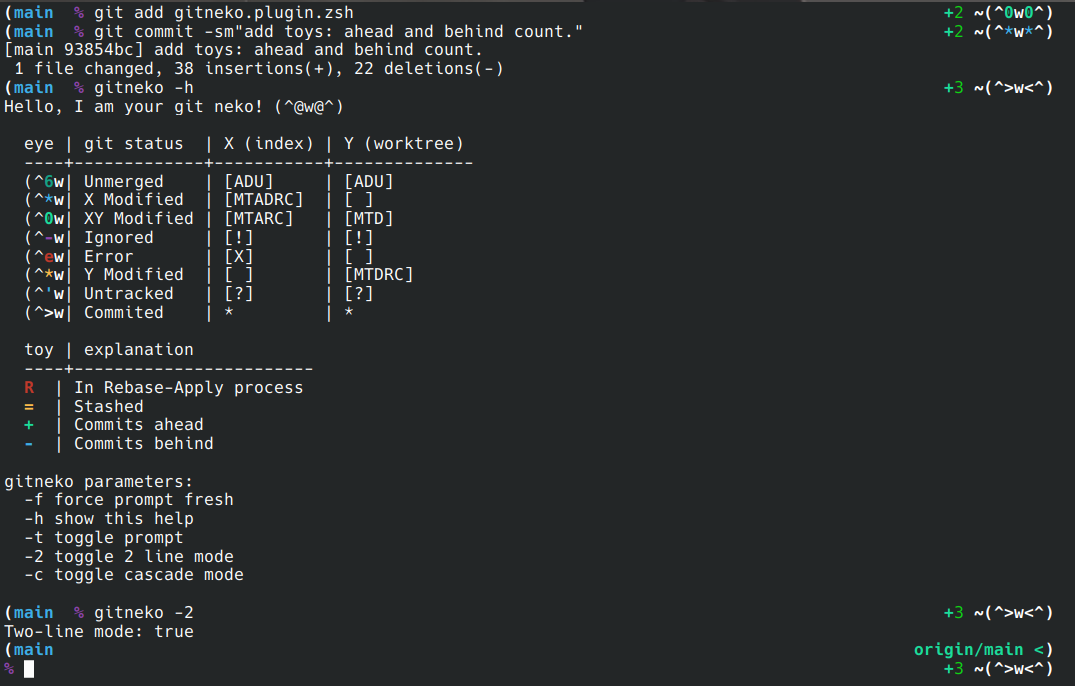
- display a kawaii neko
- display relative path
- display branch
- display git status
- python venv prompt compatibility
- display nonzero return value
- 2-line mode
- cascade print mode
- display rebase-apply status
- display stash count
- display ahead and behind commits count
- customize colors by setting
NEKOLOR_* - customize icons by setting
NEKOICON_* - ascii terminal compatibility
- can be referred as a prompt component
Simply source this script, run gitneko -h to show help information.
- If you use a static prompt, then you can enable the prompt by setting
NEKOPS_PS_Ttotrueafter loading gitneko. Then gitneko will take over your prompt whenever you change into a git directory, and recover it back when you leave. - If you already have a themed prompt but still want to add the neko to you own
PROMPT, you can simply add$NEKOPS_NEKOto related zsh hook function, which is responsible for updating your prompt. Gitneko is designed for a prompt that supports run-time updating, if you don't know how, you may find help from the developer of your prompt theme.
Install it with zsh-usepkg:
defpkg :ensure true :fetcher git \
       :from https://github.com :path gynamics/zsh-gitneko \
       :comp _gitneko :config 'NEKOPS_PS_T=true; gitneko -2'